
June 1, 2026
How to Get Your Resume Past an ATS Screen: 6 Tips from a Recruiter
By Lindsay Varner
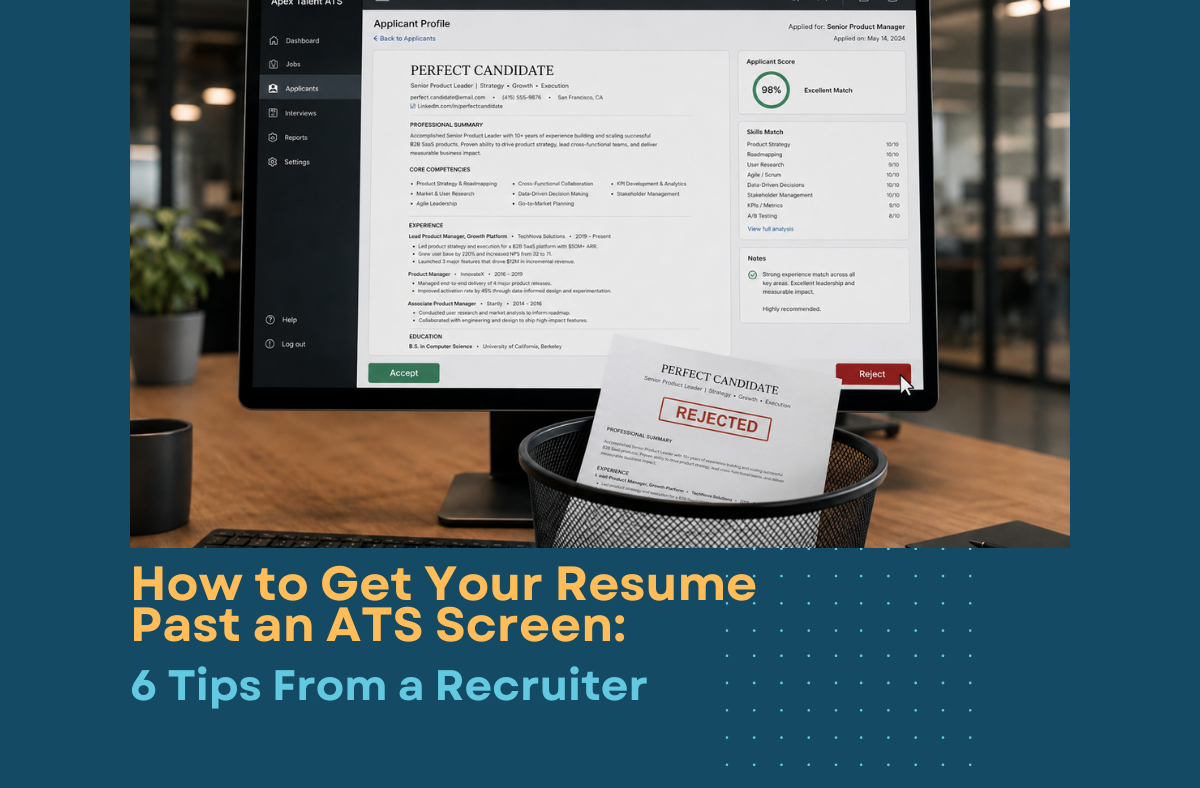
How to get your resume past an ATS is not about luck or a secret algorithm. Formatting is the key to getting seen, not stuck in a queue.
Key Takeaways
- Let a recruiter route your resume before you apply directly
- Build in Word or Docs, not Canva
- Skip columns, tables, and sidebars
- Spell out every acronym at least once
- Match your resume’s language to the posting
- Choose Word or a clean PDF, never a scanned image
How do you get your resume past an ATS? Applicant tracking systems now sit between a growing number of job applications and the recruiter who might read it. As of 2025, 97.8% of Fortune 500 companies use one, according to Jobscan’s 2025 Applicant Tracking System Usage Report.
A 2025 study of 25 U.S. recruiters by Enhancv found that only 8% of ATS platforms are configured to auto-reject candidates based on resume content, and most recruiters still review applications by hand.
Where things actually go wrong is when poor formatting prevents your experience from being understood clearly by either the ATS or the person reviewing it.
But formatting is not always the issue. We regularly see qualified candidates passed over because their resume does not clearly show the right experience, or because the person reviewing it does not fully understand the role.
The goal is not to beat the ATS. It is to make your experience easy to understand, relevant to the position, and difficult to overlook.
Here are six ways to make sure your resume gets seen, starting with the one most candidates don’t know about.
What’s the fastest way to skip the ATS queue entirely?
One of the most reliable ways to avoid getting lost in an applicant queue is to have a specialized recruiter introduce you directly to the hiring team.
Your resume may still enter the company’s ATS, but it is no longer arriving without context. The recruiter can explain why you are considering a move, highlight your most relevant accomplishments, and show why your background fits the role.
There is an important tradeoff. If you have already applied through the company’s careers page, the recruiter may no longer be able to represent you for that position. The employer’s system typically identifies you as an existing applicant.
We see this happen more often than candidates realize. A recruiter finds someone who appears to be an excellent fit, discusses the opportunity with them, and prepares to make an introduction.
Then they learn the candidate applied several weeks earlier and has been sitting untouched in the ATS. Depending on the company’s policies, the recruiter may no longer be able to submit them or provide the context that could have helped their application stand out.
That does not mean you should never apply directly. It means you should be intentional about the order.
If you work in solar, energy storage, or renewable manufacturing and are considering a move, speaking with a specialized recruiter before submitting applications can help you understand your options and avoid limiting them unnecessarily.
What resume-building tool should you use for an ATS-friendly resume?
Microsoft Word and Google Docs remain the two most ATS-reliable tools for building a resume in 2026. Both save in formats that applicant tracking systems parse in a straightforward, line-by-line way.
Canva is a different story. It’s a strong design tool, and it produces resumes that look sharp to a human reader, but Canva builds pages out of text boxes rather than a standard document flow.
Many ATS parsers read text boxes out of order or skip them entirely, which means a recruiter’s system might show your work history as a jumbled block or leave sections out altogether.
None of this is about talent or fit. It’s about whether the software can extract what you typed.
If you already have a Canva resume you love the look of, keep it for networking events and LinkedIn, and build a second, plain version in Word or Docs for anything that asks you to apply online.
Why do columns and sidebars break ATS parsing?
A two-column resume with a skills sidebar looks organized to a human eye, but most ATS parsers read straight down the page, left to right, the way a typewriter would. They don’t recognize columns, dividers, or side panels as separate zones.
Here’s what that means in practice: a skills list formatted as “Solar PV | Electrical Engineering | Utility Scale” can get read back as one garbled string, something like “Solar PVElectrical EngineeringUtility Scale,” with no spaces or structure.
Tables, text boxes, headers, footers, icons, and decorative fonts create the same problem.
The system doesn’t reject you for this. It just fails to extract your experience cleanly, which means a recruiter searching by keyword or skill may never find you, even though you’re qualified.
The fix is a single-column, linear layout with plain section headers.
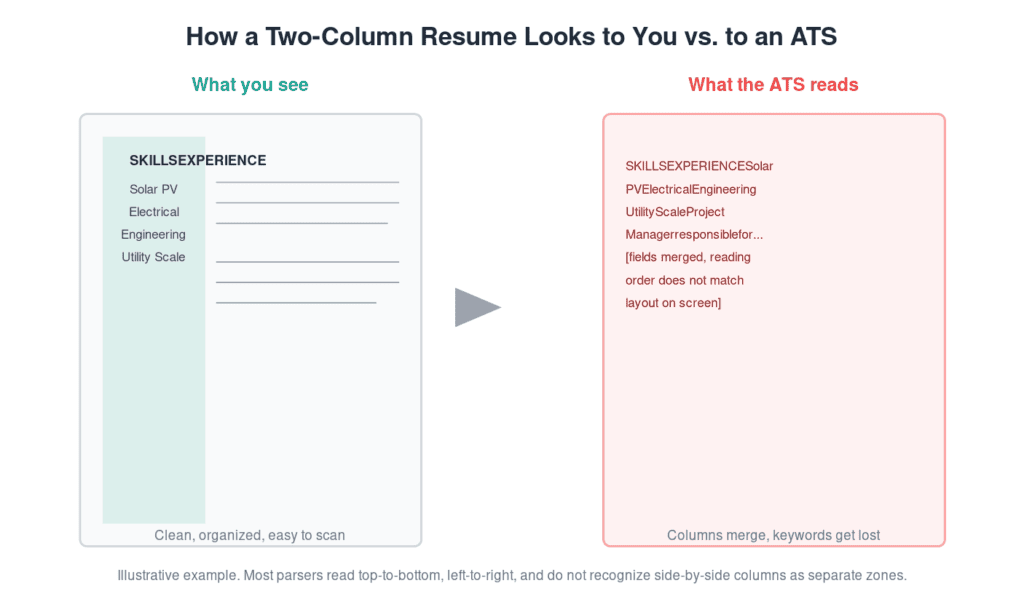
How a two-column resume looks to you vs. to an ATS. Illustrative example.
Should you rely on acronyms, or spell everything out?
Spell out every acronym at least once, then use both the spelled-out term and the acronym so you match however a recruiter searches.
This matters most in acronym-heavy fields like solar and energy storage, where a recruiter searching “Power Purchase Agreement” won’t find a resume that only says “PPA,” and vice versa.
A few worth doubling up on in clean energy resumes: Energy Storage System (ESS), Photovoltaic (PV), Independent Power Producer (IPP), and Power Purchase Agreement (PPA).
The fix takes one extra pass through your resume and costs nothing in space: place the acronym in parentheses right after the full term the first time it appears.
Skipping this step is one of the most common, and easiest to fix, reasons a qualified candidate doesn’t show up in a recruiter’s keyword search.
Do you really need to customize your resume for every job?
Yes, at least enough to match the terminology in the posting. Applicant tracking systems rank resumes against the specific language of a job description, and a generic resume submitted everywhere loses that match almost every time.
This doesn’t mean rewriting your entire resume for each application. It means checking that the words you use for your skills and experience match the words in the posting.
If a listing says “front of the meter,” make sure your resume doesn’t only say “utility scale.”
AI writing tools have made this fast. What used to take an hour of manual editing now takes a few minutes of comparing your resume against the posting and adjusting key terms.
It’s a small, repeatable habit that measurably changes whether an ATS ranks you near the top of a search or buries you on page four.
Should you submit a PDF or a Word document?
Follow the job posting’s instructions first if it specifies a format. If it doesn’t, submit a Word document as your default, and keep a clean, text-based PDF ready as a backup.
According to Jobscan’s 2025 guidance on resume formats, a properly exported PDF now parses reliably across most major applicant tracking systems.
Some platforms, including certain configurations of Workday, Greenhouse, and Lever, still handle Word documents more consistently.
What actually breaks parsing isn’t the file type. It’s scanned images, tables, multi-column layouts, or contact information buried in a header or footer, which a significant share of ATS platforms fail to read at all.
Keep your name, phone number, and email in the main body of the document, never in a header or footer, regardless of which format you choose.
| Tool or format | ATS compatibility | Best for |
| Microsoft Word (.docx) | High across most major platforms (Workday, Greenhouse, Lever, Bullhorn) | Default choice unless a posting says otherwise |
| Google Docs (exported as .docx) | High | Candidates who draft resumes online |
| Clean, text-based PDF | High, but varies by platform | When a posting specifically requests PDF |
| Canva export (PDF or image) | Low; frequent parsing errors from text boxes | Networking materials and LinkedIn, not online applications |
Comparison based on Jobscan, “Resume PDF vs Word: Which Should You Choose in 2025?,” 2025.
Is it true that 75% of resumes get rejected by an ATS before a human sees them?
No, and it is worth saying clearly: the widely repeated claim that applicant tracking systems automatically reject 75% of resumes before a human reads them does not hold up.
That figure traces back to a 2012 marketing claim from a resume optimization company that closed the following year. No published methodology has ever supported it.
A 2025 study of 25 U.S. recruiters found that only 8% used automatic rejection based on resume content. Most relied on human review, supported by basic eligibility questions and search filters.
But reaching a human does not guarantee your experience will be understood. Poor formatting can garble your resume, and the human filter is only as effective as the person reviewing it.
At larger companies, initial screening is often handled by an HR professional hiring across multiple departments. They may understand the basic requirements without fully grasping the technical nuances of the role.
That matters in solar, energy storage, and renewable manufacturing, where titles vary, and similar experience can look very different from one company to another.
Qualified candidates can be overlooked because the reviewer does not recognize how their experience translates, or because the resume does not make that connection clear enough.
The goal is not to outsmart the ATS. It is to make your experience easy for the system to process and clear enough for any reviewer to understand.
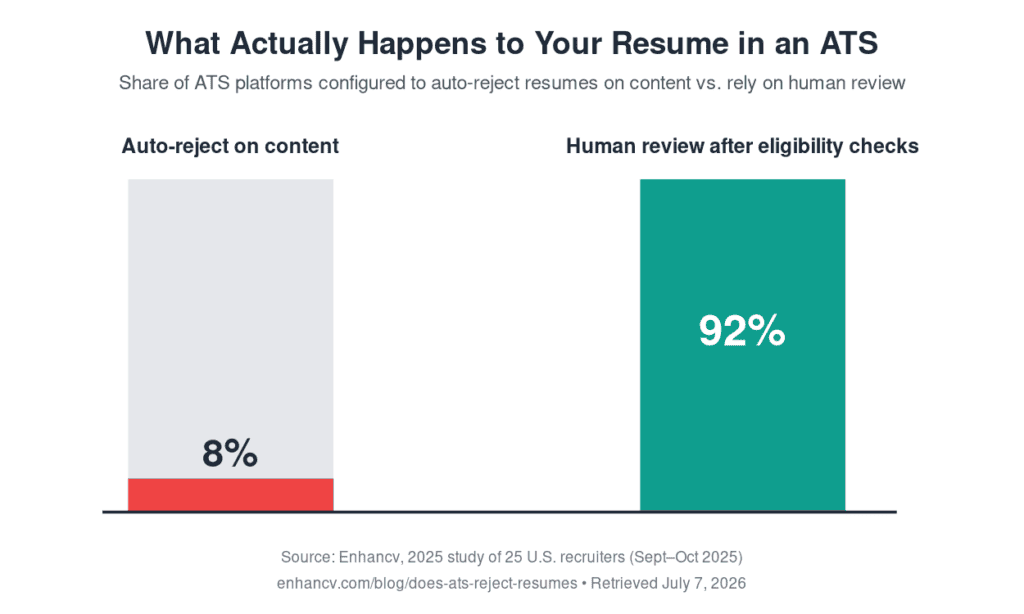
What actually happens to your resume in an ATS. Source: Enhancv, 2025.
Ready to skip the ATS queue?
Search our current solar, energy storage, and renewable manufacturing openings, or sign up for job alerts and let a recruiter route your resume directly to the hiring manager instead of a queue.
Conclusion
Getting through an ATS mostly comes down to structure, not tricks.
- Skip the columns, sidebars, and text boxes.
- Spell out acronyms at least once.
- Match your resume’s language to the job posting.
- Choose Word or a clean PDF over a Canva export.
The software is far less likely to automatically reject you than the internet suggests. The bigger risk is that your experience is displayed poorly or is not clear enough for a reviewer who may not understand the technical nuances of the role.
Formatting is not about beating a robot. It is about making your experience easy for the system to process and easy for the right person to recognize.
And if you want to avoid getting lost in an applicant queue, working with a recruiter who knows your industry is still one of the most direct paths to the hiring team. They can provide the context your resume alone may not capture, before a direct application limits that option.
Search our current openings or sign up for job alerts, and let us help make sure your experience reaches the right people.
FAQs
Does Canva work for an ATS-friendly resume?
Canva isn’t the best choice if a job application will run through an applicant tracking system. Canva builds resumes with text boxes and free-form design elements, and most ATS parsers read documents in a single top-to-bottom, left-to-right pass.
That mismatch means sections can get skipped, reordered, or merged into unreadable blocks, even when the resume looks polished to a person.
Microsoft Word and Google Docs remain more reliable choices for anything you’re submitting through an online application, because they save in a structured, linear format that parsers handle consistently.
This doesn’t mean Canva is a bad tool. It’s a strong choice for a resume you’re sending directly to a person, sharing on LinkedIn, or printing for a networking event, where a human, not software, sees it first.
Keep a Canva version for those situations and a plain Word or Docs version for anything with an online application form.
Should I submit my resume as a PDF or a Word document?
Both formats generally work, and the safest move is to follow the job posting’s instructions when it specifies one. .According to Jobscan’s 2025 guidance on resume formats, a clean, text-based PDF now parses reliably across most major applicant tracking systems, but some platforms, including certain configurations of Workday, Greenhouse, and Lever, still handle Word documents more consistently.
What breaks parsing isn’t the file type. It’s scanned images, tables, multi-column layouts, or content buried in a header or footer.
If a posting doesn’t specify a format, submit a Word document as your default, and keep a matching PDF ready in case an application system asks for one instead.
Never place your contact information in a header or footer, since a significant number of ATS systems fail to read that section at all.
Is the “75% of resumes get rejected by ATS” statistic real?
No. That statistic traces back to a 2012 marketing claim from a resume-optimization vendor that shut down the following year, and no study has ever published the methodology behind it.
Enhancv’s 2025 study of 25 U.S. recruiters found that only 8% of applicant tracking systems were configured to auto-reject resumes based on content, with the large majority relying on human review after basic eligibility checks.
The real risk to a poorly formatted resume isn’t silent rejection by an algorithm. It’s a recruiter’s screen displaying your experience so poorly, or so far down a ranked list, that you lose the advantage of being seen quickly.
Formatting your resume cleanly still matters. It just matters for a more mundane reason than a secret robot gatekeeper.
What’s the benefit of working with a recruiter instead of applying directly?
When a recruiter submits you for a role, your resume goes straight to a hiring manager along with context that no application form captures: your career story, your strongest wins, and why you fit this specific opening.
That’s a different experience than being one of hundreds of applications sitting in a queue.
There’s one important rule to know. If you’ve already applied to a company directly through its own careers page or ATS, most recruiters can no longer present you for that same role, since the employer’s system will already have you on file.
If you’re exploring solar, energy storage, or renewable manufacturing roles, it’s worth checking with a recruiter before you apply anywhere on your own, so you don’t accidentally close off that option.
Sources
- Jobscan. “2025 Applicant Tracking System (ATS) Usage Report.” Jobscan, 2025. jobscan.co/blog/fortune-500-use-applicant-tracking-systems. Retrieved July 7, 2026.
- Jobscan. “Resume PDF vs Word: Which Should You Choose in 2025?” Jobscan, 2025. jobscan.co/blog/resume-pdf-vs-word. Retrieved July 7, 2026.
- Enhancv. “Does the ATS Reject Your Resume? 25 Recruiters Explain What Really Happens.” Enhancv, 2025 (study conducted September–October 2025). enhancv.com/blog/does-ats-reject-resumes. Retrieved July 7, 2026.
Related posts
Check out these posts
Let's Talk
Partner with Peak Demand for Expertise in the Renewable Energy Industry. Whether you're an employer seeking top talent or a professional searching for your next opportunity, Peak Demand is here to help.